userstyles.org - Adblockplus themes and skins

Iconic MenuBar Fix

Just a fix for Iconic MenuBar - Crystal SVG(http://userstyles.org/styles/1123) See screenshots

Updated: Sep 17, 2007 Installs This Week: 6 Average Rating: Good
Iconic Menubar - Crystal SVG

Adds icons to the menubars. If you want the menubar to be all icons with no text, install Icons-Only Menubar in addition to this style. Uses icons from CuteMenus - Crystal SVG (mostly Crystal SVG icons). Supports Firefox, Flock, Thunderbird, and (somewhat) Sunbird. Sunbird support should work fine if you replace the images with local (or chrome) files. Supported extensions: Adblock Plus, Calculator, Chipmark, Compact Menu, del.icio.us, DOM Inspector, EditTXT, FastEdit, Firefox Google Bookmarks, HyperBK, More Tools Menu, MR Tech Local Install, PlainOldFavorites, SamePlace, Split Browser, Tabs Menu, Testo - Text Editer, and Tiny Menu. Remove the specific related -moz-document line at the beginning to de-iconify any specific window. The -moz-document is actually currently not needed at all, so you can remove it entirely if you want this to apply anywhere regardless of whether or not support is claimed. Simply replace the url next to the correct list-style-image (I've marked each one t

Updated: Jan 5, 2008 Installs This Week: 4 Average Rating: Good
(No screenshot available)
Adblock + 7 status-bar icon change

The Default Icon for Adblock + in the status bar is a cockroach with a "no" symbol when active; just the roach when inactive. This was not descriptive to me so I changed the icon to be better descriptive. You can create base64 images from here: http://www.motobit.com/util/base64-decoder-encoder.asp Updated 4/8/2006

Updated: Apr 8, 2006 Installs This Week: 2 Average Rating: Good
Adblock Plus - Visual Alert if Disabled

Animates the Statusbar when you disable the AdBlock Plus ad-filter. Works only for Firefox 3 Features: + Animated background of the Status Bar when the Adblock Plus Extension's status is Disabled + The animation will cycle through Red, then Yellow, then Orange. This is done in a slow manner, not to be too distracting to the user. + More flashy to the eyes, notifying you that your browser is at a security risk + Animation and background color may be customized Applies to: + Adblock Plus Status Bar Icon (ABP) Clarification: **This style does not flash the statusbar when you disable the AdblockPlus Extension, it flashes when you disable Ad Block Plus** Integrates with Styles: + Adblock Plus - Custom Filterlist Window Background + Adblock Plus - Dynamic Apply Button + AutoPager - Visual Alert if Disabled + Find Bar - Visual Alerts (Animated) Works on: - Firefox3 Only. Changelog: 1.0.0.1: + Added code to compress (shrink) the ABP statusbar icon when Adblocking is enabled. + When Adblock is disabled, the statusbar will expand and be more noticeable.

Updated: Nov 12, 2008 Installs This Week: 2 Average Rating: Good
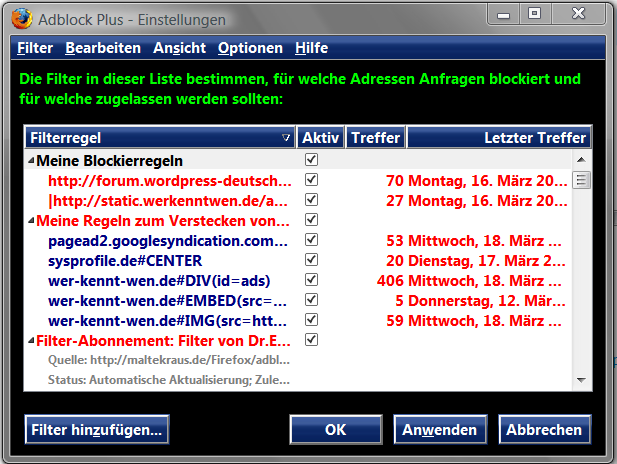
Black Vista - Adblock Plus

Fenster in Schwarz mit NeongrĂ¼ner Schrift und dunkelblauen Buttons window in black with limegreen letters and darkblue Buttons Angeglichen zum Theme >>> Firefox 3** Vista - Theme Dark Blue II http://userstyles.org/styles/14405 Aligned to the theme >>> Firefox 3** Vista - Theme Dark Blue II

Updated: Mar 20, 2009 Installs This Week: 3 Average Rating: N/A
(No screenshot available)
Sliding Iconic Menubar for Firefox 2

Not my own work!! This is a mix of "style 993" with "style 1119" and "style 1123" thx to "user 12" and "user 9"

Updated: May 23, 2007 Installs This Week: 1 Average Rating: Good
Adblock Plus - Custom Filterlist Window Background

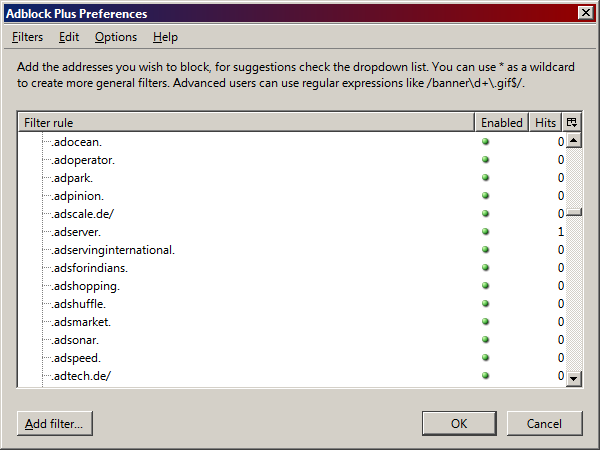
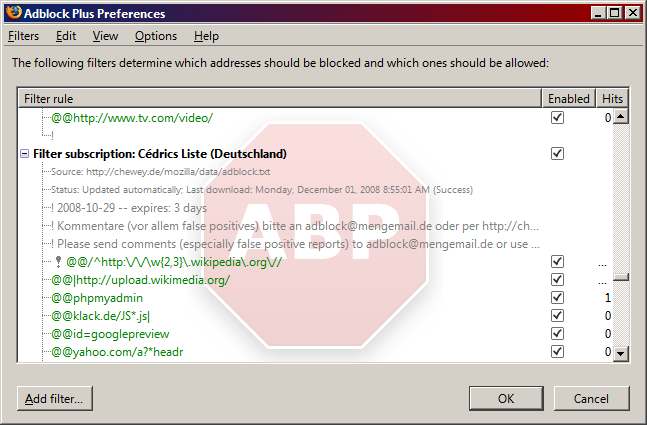
Allows you to Customize the text and background image of the Adblock Plus FilterList. Features: + Background image will be a faded ABP Red logo with shadowing + Supports a huge list of Fonts (discussed below) + Image supplied in default code is hard-coded - allowing you to view the background, even when offline! + Background image is static and is centered on the window. = Optional - Text size of the update details will be larger (must uncomment) = Optional - Bold text for easier readability (must un-comment) Fonts Supplied (Supported): - Currently, I supplied the following Fonts in the Code: 1. Segoe UI (User Interface of Vista) 2. Calibri (Text of Vista) 3. Verdana (XP Font) 4. Helvetica (XP) 5. Tahoma (XP User Interface Default Font) 6. Arial Global Font Applies to: + ABP Filter List + AdblockPlus Preferences + Filter Subscription Page + Ad Blocking Options Browser Versions: - Works on Firefox 3 - Works on Firefox 2 Additional Information: + Feel

Updated: Dec 3, 2008 Installs This Week: 1 Average Rating: Good
Cutemenus Classic Companion - Adblock Plus

This userstyle adds icons to all Adblock Plus menuitems. http://adblockplus.org/ This userstyle is meant to be used in conjunction with CuteMenus Classic Companion. ---------------- Some of these icons require the Cutemenus Classic addon located here: https://addons.mozilla.org/en-US/firefox/addon/4142

Updated: Nov 28, 2009 Installs This Week: 2 Average Rating: N/A
Cute Iconic Menu Bar

Cute Iconic Menu Bar Embossed menu only icons! Popup menu with rounded corners.

Updated: Oct 4, 2011 Installs This Week: 2 Average Rating: N/A