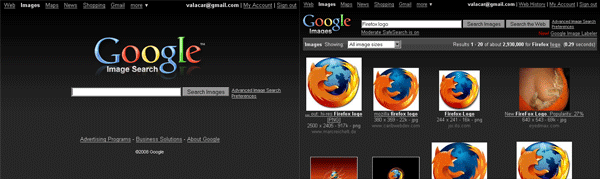
Dark gray/black color scheme for Google's Image Search page
Note: This style only works for google.com. To make it work for other countries, use a plain text editor to search for "google.com" and replace all occurrences with "google.co.uk" or whatever you use.
More of my google styles:
- Google Image Search - gray logo replacement (vC)
- Google Web Search - dark blue redesign (vC)
- Google Web Search - dark gray redesign (vC)
- Google Web Search - gray logo replacement (vC)
- Google Video - dark gray redesign (vC)
Feel free to visit my userstyle site at http://www.valacar.com/userstyles/
So nice so well...
Will it work with Google AdSense search result page?
I just love your styles!
For those of you in india and other places who want to use this style jst replace .com to .co.in (or ur domain) in the script.

It works perfectly.
Thanks again for this style.
I love the design. I had to add the following line to the @-moz-document url to get it to work with the google toolbar though:
url-prefix(http://www.google.com/images),
If anyone wants a Demonoid invitation contact me at spammy@spambog.com
Your themes are the best. I always look for "vC" because they are always my favorite preferences. Everyone always asks how I got google and youtube in black. :) Thanks very much for your continued work on these.
Google has changed their sites yet again - this time all coloring for header/footer area bars and the Google Navigation image at the bottom are failing in this style - the colors show as flat light gray areas with white text and the Google Navigation image shows up as the standard white background/colored letters instead of the text replacement found in this style.
Just what I wanted!
Can someone make this in the blue and upload it. I think the blue looks better.
This is truely a great app, and style! if you could do it for gmail as well, that would be awesome!
besser geht nicht!!
The update to Google Image Search makes the the new hover effect very ugly with this style on. To fix that without disabling the new feature, use this code:
td[id^="tDataImage"] > div[id^="div_image"],
td[id^="tDataText"] > div {
background: none !important;
}To disable the feature entirely, use Google Image Search back to normal instead.
Great stuff! - I'd love to have a match for regular search.
This is very easy on the eyes; it's much better than the white!
Another winner.
Nice. Can you make for the regular Google search? The gray is nicer than your blue one.
i live in costa rica and i think the frontpage image is different cuz the logo still hast white background. is there a workaround?
dude, you're a CSS ninja (:
If I only could, I'd give 7 stars ;).
Google Images never looked so good! Silky smooth gradients, and some nice reflections make this an A++ grade redesign. 5 stars! Great work.
Excellent! Very clean and I absolutely love the new logo, especially the reflection. If you could duplicate this for the main Google search page I would be very grateful. Perhaps a dark blue and dark grey for each (Gmail and Google)? My only criticism (a tiny one) is that the gradient at the top is quite choppy. Not sure if this is a depth restriction of base64 or what, but I may redo it as a jpg in PS. Still, I'd give you 6 stars if I could!
I like the concept, but would prefer to have it "match" the Google Search Page style instead. (I want both to be blue instead of gray.) Any suggestions would be appreciated.
You are the man, I like it so much!! 5 Points from Switzerland! Thanks for sharing with us!
Cheers mate!
.ad {
/* Your ad can be here instead. 10K unique visitors for $5/day. Mail me. */
}