| Author | dotter |
|---|---|
| Created | Jun 3, 2008 |
| Updated | Jun 10, 2008 |
| Installs (this week) | 1 |

| Installs (total) | 719 |
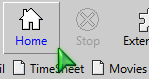
Allows you to Customize the hover-color of the toolbar buttons. When your mouse is hovering over your bookmarks toolbar icons, they will be highlighted in a different custom color. Increases screen navigation and readability.
Once again, this style supports both Firefox2 and Firefox3.
Applies to:
- Bookmarks Toolbar (text of your bookmarks)
- Navigation Toolbar (if your toolbar buttons have text - Right Click / Customize and Select "Icons & Text")
- Main Toolbar (Text of custom or Extension's buttons)
- Also Applies to EVERY single toolbar button on any window of a popup or pane (Stylish toolbar buttons in the Manage Styles window, for example)
Browser Versions:
- Works on Firefox 3
- Works on Firefox 2
Integrates with Custom Bookmarks Toolbar Button Text and BG Color
Changelog:
1.0.0.1:
- Removed !important code so it can Integrate properly with Custom Bookmarks Toolbar Button Text and BG Color.
+ Added me as author. (don't know why I forgot it!)
Once again, this style supports both Firefox2 and Firefox3.
Applies to:
- Bookmarks Toolbar (text of your bookmarks)
- Navigation Toolbar (if your toolbar buttons have text - Right Click / Customize and Select "Icons & Text")
- Main Toolbar (Text of custom or Extension's buttons)
- Also Applies to EVERY single toolbar button on any window of a popup or pane (Stylish toolbar buttons in the Manage Styles window, for example)
Browser Versions:
- Works on Firefox 3
- Works on Firefox 2
Integrates with Custom Bookmarks Toolbar Button Text and BG Color
Changelog:
1.0.0.1:
- Removed !important code so it can Integrate properly with Custom Bookmarks Toolbar Button Text and BG Color.
+ Added me as author. (don't know why I forgot it!)
More Info
Feedback
Discussions
No discussions posted yet. Be the first to ask a question or review this style.