| Author |
Moktoipas |
| Created |
Oct 30, 2007 |
| Updated |
Oct 30, 2007 |
| Installs (this week) |
17 |
| Installs (total) |
16,504 |
| Average rating |
|
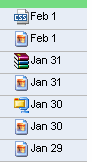
See from your inbox what kind of attachment an email has.
This script is the new version of Gmail with different attachment icons.
I updated it because Gmail new version changes a lot of things :)
This scripts works in both version of Gmail.
To contact me: [*]
+ Update with Stylish
+ Install with Stylish
To use this style, install Stylish, then reload this page. If you already have Stylish, make sure this site is allowed to run JavaScript.
(Though installing Stylish is recommended, you can also install this style as user script.)
(Assuming
)
Feedback
Discussions
Ask a new question or add a review for this style.
- Allow for direct download by krugster, June 11, 2010
- Hey here is a fix for the interference with Insert Images lab by ionuke, May 18, 2010
- hides images in mail content by Paweł Kubisz, June 24, 2010
- Downloading attachments through the icons by Tungsten, October 9, 2009
- icon for tar.bz2 by smaug, August 25, 2009
- Thanks for this!
A minor caveat is that this (a by beq, August 19, 2009

- Interferes with Gmail Labs - Inserting images by beq, September 26, 2009
- gmail updated by Henrique Abreu, July 2, 2009
- Work great! Thanks by Henrique Abreu, June 3, 2009
- Excellent Work. by Verus, May 6, 2009
- Great for knowing what, exactly, is attached. by RPM, February 17, 2009
- Great style! by xren, October 9, 2008
- Thanks, this version works great! Useful script. by Alaaddin, September 15, 2008
- This is so much more useful than the generic attac by timepiece, May 28, 2008
- please include the MS Office 2007 icons also. by Manoj, April 10, 2008
- Thanks for the update :) by hug, February 6, 2008
- Thanks for the quick update! No telling how long by FLskydiver, November 1, 2007