Deleted!
This style has been deleted.

| Author | Barbiegirl |
|---|---|
| Created | Dec 30, 2009 |
| Updated | Feb 20, 2011 |
| Installs (this week) | 0 |
| Installs (total) | 452 |
| Average rating |
|
#446
███ DEMO WITH AUDIO: ███ ►►► http://www.swfcabin.com/open/1296129559 ◄◄◄
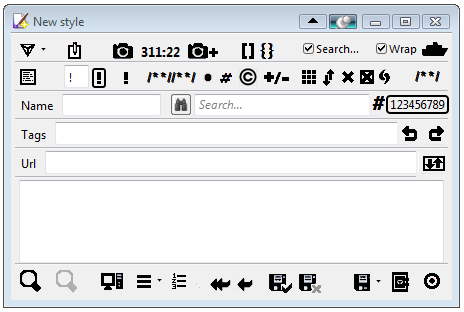
Stylish Custom Editor - Toolbar Buttons are icons without any text. Firefox Addon: Stylish Custom https://addons.mozilla.org/en-US/firefox/addon/12105
► 36 icons so far (+ some extra choices): I made most of these icons myself from scratch in Paint.
Insert, External editor, Page, auto!important;, !important, Clear Button for the Findbar, Clear Button for the ScratchPad, Toggle ScratchPad, Toggle Toolbar, Merge, Comment, Comment Group, Clone Style, Bracket, Curly Bracket, ID, Class, Undo, Redo, Export Style, Preview, Un-Preview, Insert Text, Flashback, Add Flashback, Customize Toolbarbutton Window, Save Enabled, Save Disabled, Save, Save and Close (VAULT SAFE with door closed), Revert(Last Save), Revert(Original),"SAVE BUTTON THAT SAVES WITH DROPDOWN MENU (Save & Close,Revert Last Save,Revert original)", LineNumberSearch Button, Close, Findbar Findbutton (More icons to com
███ DEMO WITH AUDIO: ███ ►►► http://www.swfcabin.com/open/1296129559 ◄◄◄
Stylish Custom Editor - Toolbar Buttons are icons without any text. Firefox Addon: Stylish Custom https://addons.mozilla.org/en-US/firefox/addon/12105
► 36 icons so far (+ some extra choices): I made most of these icons myself from scratch in Paint.
Insert, External editor, Page, auto!important;, !important, Clear Button for the Findbar, Clear Button for the ScratchPad, Toggle ScratchPad, Toggle Toolbar, Merge, Comment, Comment Group, Clone Style, Bracket, Curly Bracket, ID, Class, Undo, Redo, Export Style, Preview, Un-Preview, Insert Text, Flashback, Add Flashback, Customize Toolbarbutton Window, Save Enabled, Save Disabled, Save, Save and Close (VAULT SAFE with door closed), Revert(Last Save), Revert(Original),"SAVE BUTTON THAT SAVES WITH DROPDOWN MENU (Save & Close,Revert Last Save,Revert original)", LineNumberSearch Button, Close, Findbar Findbutton (More icons to com
More Info
►►►INSTRUCTIONS: CLICK the MONITOR ICON for the SAVE BUTTON, and CLICK it's COMPUTER BOX for it's DROPDOWN MENU.
► Also:COMPUTER ICON for tabs,urlbar,toolbarbutton,statusbar icon: 448 STYLISH COMPUTER (STYLE REMOVED)
■ Look in the code, there are a few ICON choices to choose from if you like. Example: Save Enable has a black checkmark or you can choose it with a GREEN CHECKMARK.
● I HIGHLY RECOMMEND THIS PERFECT BUTTON written by rawny called "Stylish Quick Edit":
http://custombuttons2.com/index.php?q=en-us/forum/buttons/buttons-database/stylish-quick-edit.html
UPDATE: Added hover effect. I deliberately set Icons to shift when clicked, for effect.Save Disabled CROSS X is lightgrey. You can choose black X instead.
UPDATE:REMOVED WORD "Search" in the findbar - you can change it to smaller font and lighter color to be less noticeable.Removed the search icon in the findbar, but keep it's clear x icon.
UPDATE: ADDED ICON FOR "SAVE BUTTON THAT SAVES WITH DROPDOWN MENU (Save & Close,Revert Last Save,Revert original)".
INSTRUCTIONS: CLICK the MONITOR ICON for the SAVE BUTTON, and CLICK it's COMPUTER BOX for it's DROPDOWN MENU.
UPDATE: Save and Close icon: is a "VAULT SAFE" WITH THE DOOR CLOSED... get it ?... the vaulted safe keeps it saved and vaulted door is closed because it is save and close.
-----------------------------------------------------------------------------------------------------------------------------
► Also:COMPUTER ICON for tabs,urlbar,toolbarbutton,statusbar icon: 448 STYLISH COMPUTER (STYLE REMOVED)
■ Look in the code, there are a few ICON choices to choose from if you like. Example: Save Enable has a black checkmark or you can choose it with a GREEN CHECKMARK.
● I HIGHLY RECOMMEND THIS PERFECT BUTTON written by rawny called "Stylish Quick Edit":
http://custombuttons2.com/index.php?q=en-us/forum/buttons/buttons-database/stylish-quick-edit.html
UPDATE: Added hover effect. I deliberately set Icons to shift when clicked, for effect.Save Disabled CROSS X is lightgrey. You can choose black X instead.
UPDATE:REMOVED WORD "Search" in the findbar - you can change it to smaller font and lighter color to be less noticeable.Removed the search icon in the findbar, but keep it's clear x icon.
UPDATE: ADDED ICON FOR "SAVE BUTTON THAT SAVES WITH DROPDOWN MENU (Save & Close,Revert Last Save,Revert original)".
INSTRUCTIONS: CLICK the MONITOR ICON for the SAVE BUTTON, and CLICK it's COMPUTER BOX for it's DROPDOWN MENU.
UPDATE: Save and Close icon: is a "VAULT SAFE" WITH THE DOOR CLOSED... get it ?... the vaulted safe keeps it saved and vaulted door is closed because it is save and close.
-----------------------------------------------------------------------------------------------------------------------------
Feedback
Discussions
Ask a new question or add a review for this style.